
“Panoramic carousel” and “seamless carousel” are often used as if they mean exactly the same thing. They overlap, but the distinction is useful: one describes the source image; the other describes what happens at the swipe.
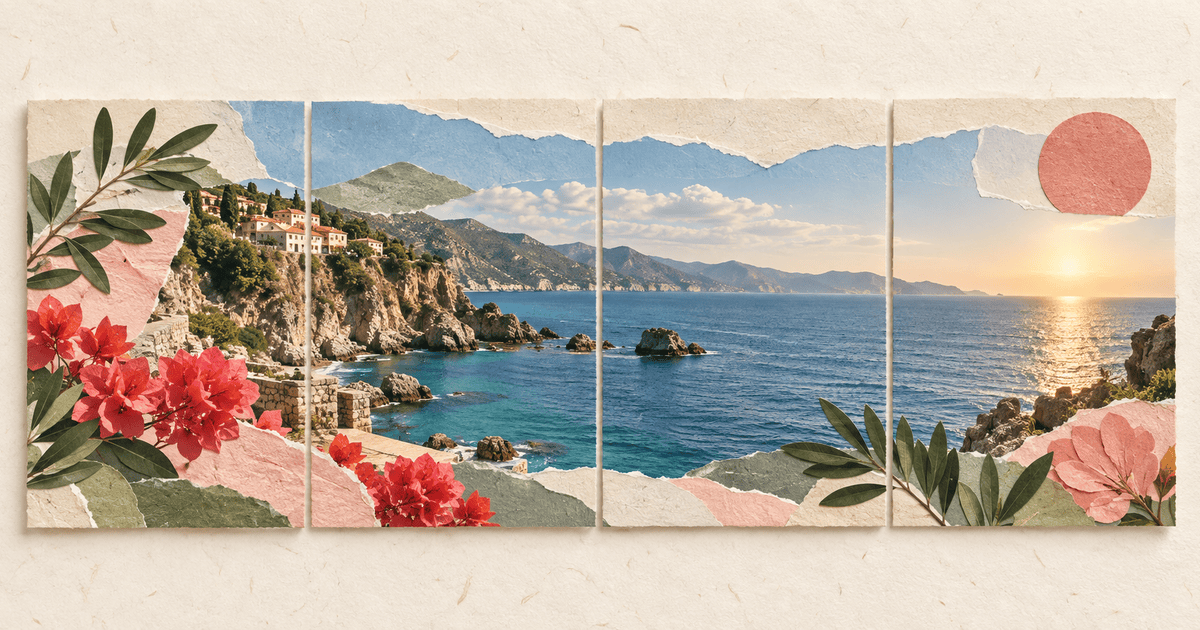
The quick answer: A panoramic carousel splits one wide photograph across several slides. A seamless carousel can use photography, typography, illustration or collage; its defining feature is that visual elements continue across the slide boundaries. Every panoramic carousel can be seamless, but a seamless carousel does not need to be a panorama.
The three carousel types
| Type | What continues across slides? | Best use |
|---|---|---|
| Standard carousel | Nothing has to connect | Lists, tutorials, before-and-after posts |
| Panoramic carousel | One wide photograph | Landscapes, interiors, events, group scenes |
| Seamless carousel | Any visual element or layout | Editorial stories, launches, portfolios, collages |
What is a panoramic carousel?
A panoramic carousel begins with a scene wider than one Instagram slide. The image is divided into equal panels, but the horizon, architecture and subjects line up across every cut. Swiping feels like moving a window across one long photograph.
It works best when the original photo already contains a reason to travel sideways:
- A coastline or mountain range.
- A long room or table.
- A group spread across a scene.
- A mural, streetscape or stage.
- A before-and-after transition captured in one wide composition.
The photograph does most of the work. Your job is to choose seams that do not slice awkwardly through faces or important details.
Read the full panorama carousel walkthrough when you are ready to build one.
What is a seamless carousel?
A seamless carousel is designed so the boundary between slides participates in the composition. A photograph might continue across it, but so can a colored paper shape, a sentence, a line, a cutout person or a cluster of stickers.
The most useful seamless designs give the reader a reason to swipe. An object leaves the first slide and appears to continue just beyond the edge. The next slide resolves it, then opens another visual thread.
That makes seamless collage especially good for:
- Campaign and product stories.
- Photo essays with captions.
- Portfolios and process breakdowns.
- Event recaps.
- Scrapbook narratives.
If the term itself is new, start with what a seamless carousel means.
A standard carousel is sometimes better
Continuity is a technique, not a requirement. Use independent slides when each panel needs to stand alone, the post will be read out of order, or you are building a clean step-by-step guide. A forced panorama can make simple information harder to read.
You can also combine the approaches: a continuous background across the whole post with self-contained text blocks on each slide.
How to choose the right format
Ask three questions.
Is the source already wide?
If one photograph contains the full story, use a panoramic carousel. Do not decorate it until you have tested the seams.
Does the story need several kinds of media?
If you are mixing photos, words and cutouts, use a seamless collage. Build everything on one long canvas so the relationships remain visible while you design.
Must every slide work by itself?
If followers may screenshot or share individual slides, use a standard carousel or keep the essential information inside each panel's safe area.
How to make either version on iPhone
1. Choose the number of slides
Three to five slides is enough for a first attempt. Jodu supports multi-page projects up to 20 pages, but a short carousel is easier to compose and test.
2. Use one continuous canvas
Open Jodu and start a carousel project. Design across the full width rather than creating isolated slides and hoping the edges match later.
3. Add the panorama or build the collage
For a panorama, scale the wide photo until it fills the height and inspect where every seam lands. For a seamless collage, let only selected elements bridge the boundaries. Keep captions and faces comfortably away from cuts unless crossing the seam is deliberate.
4. Check the slide math
For portrait posts, use 1080 × 1350 pixels per slide as the delivery target. The master canvas width is the slide width multiplied by the number of slides. The Instagram carousel dimensions guide contains the exact grid math and export checks.
5. Export in order
Jodu renders the pages as a matched set. When posting, select them in the exported order and preview the sequence before publishing.
Common seam mistakes
- A face sits exactly on a cut. Move the image or choose a different slide count.
- The horizon jumps. Build from one master canvas rather than cropping each slide separately.
- Text becomes unreadable. Keep important words inside one slide unless the split is a deliberate large-type effect.
- Nothing invites the first swipe. Let a nonessential image or paper shape continue visibly beyond the first edge.
- Every object crosses a boundary. Continuity needs quiet areas; bridge only the elements that guide the reading direction.
Frequently asked questions
What does panoramic carousel mean?
It usually means one wide photo divided across several swipeable slides. When the crop and export align correctly, the scene appears to continue as you swipe.
Is a seamless carousel the same as a panorama?
Not always. A panorama uses one wide scene. A seamless carousel can connect any visual material across slides, including text, illustration and collage.
What size should the slides be?
For a portrait Instagram carousel, 1080 × 1350 pixels per slide is the standard working target. Multiply 1080 by the number of slides to calculate the full master-canvas width.
Do I need Photoshop to split the image?
No. Jodu provides a continuous carousel canvas on iPhone and exports the aligned slide images, so you do not need to measure and slice the panorama manually.