
A Pinterest board and a Pinterest collage can contain the same images, but they do different jobs. A board helps you collect. A collage helps you decide what the collection means.
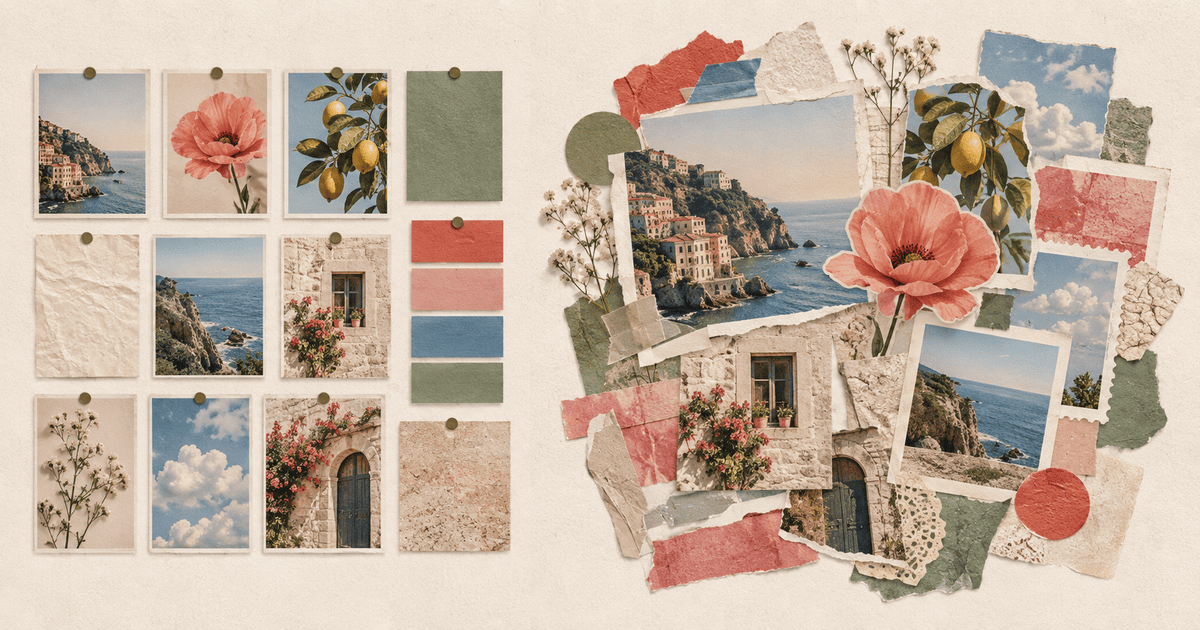
The difference: A board is an organized collection of Pins that you can keep adding to. A collage is a composed visual made from selected images or cutouts. Use a board to gather possibilities; use a collage to edit those possibilities into one direction.
Board versus collage
| Pinterest board | Collage | |
|---|---|---|
| Main purpose | Save and organize ideas | Combine ideas into one visual |
| Structure | A growing collection of Pins | One designed composition |
| Best stage | Research and discovery | Selection and presentation |
| Typical action | Save, sort, search and collaborate | Cut out, resize, overlap and arrange |
| Finished result | A library you revisit | An image, moodboard, outfit or concept |
Pinterest describes boards as places to save and organize Pins so you can find them later. A board can be public, private or collaborative.
Pinterest's collage tool does something different: it lets you take whole Pins or selected objects from them, arrange those pieces in layers, and publish the result as a new Pin. You can also use a separate app to make a collage from saved pins and export it outside Pinterest.
Think of the board as your material shelf
A board is deliberately unfinished. You might save fifty kitchens before noticing that the ones you love all use dark timber, small tiles and chrome. You might collect a hundred outfit Pins before realizing the common thread is a red shoe.
That abundance is useful. Do not force a board to behave like a final design. Let it hold alternatives, near-misses and references that contradict each other.
A few ways to keep a board useful:
- Give it a specific purpose: “small blue kitchen” beats “home.”
- Create sections when one board contains several directions.
- Save source links and useful notes, not just attractive images.
- Remove duplicates when the board becomes hard to scan.
- Start a collage once a pattern becomes visible.
Think of the collage as the decision
A collage is selective. It takes the strongest five, ten or twenty elements and makes them coexist on one canvas. Scale and overlap create relationships that a grid cannot show.
For example, an outfit board answers questions a folder of product Pins does not: Is the coat more important than the dress? Does the bag repeat the shoe color? Is the entire look too formal once everything sits together?
An interior collage can place a sofa beside flooring, a lamp and two paint swatches. A travel collage can turn disconnected saves into one visual story. A vision board can place goals beside the images that make them feel concrete.
Pinterest Collages or a separate collage app?
Pinterest's own collage composer is useful when you want to work with Pinterest cutouts, remix an existing collage, keep product information attached, or publish the result as a Pin.
A separate tool is useful when:
- The finished image needs to go to Instagram, Photos, print or another app.
- You want to mix private camera-roll photos with Pinterest inspiration.
- You want a particular scrapbook, frame or typography style.
- You need a multi-page composition such as a carousel.
- You prefer the image processing to happen on your phone.
There is no need to choose one forever. Many people collect in Pinterest, compose in another app, then share the result wherever it belongs.
How to turn a Pinterest board into a collage on iPhone
1. Open the board and make one final edit
Remove obvious duplicates and save only the images that support the direction. You do not need to reduce the board to five Pins yet; just make it easy to scan.
2. Start a collage in Jodu
Open Jodu, choose a canvas ratio and set a simple background. Jodu is free to download and includes a seven-day full-feature trial.
3. Import the pins
Tap Photo, switch to Pinterest, connect your account, choose the board and select the pins you want. The full Pinterest import guide shows every screen.
4. Turn the best pieces into cutouts
Keep some Pins rectangular for context, then use Remove BG on the objects that should overlap. Jodu performs the subject isolation on-device.
5. Arrange by importance
Make the defining image largest. Let supporting images overlap its edges, repeat two or three colors, and leave some empty space. A collage becomes clearer when every piece does not shout at the same volume.
6. Export the finished direction
Save the collage to Photos. Keep the Pinterest board as the deep archive and the collage as the concise visual you can share.
Frequently asked questions
Is a Pinterest board the same as a moodboard?
It can function as an inspiration archive, but a traditional moodboard is more edited and composed. Turning selected Pins into one collage usually makes the visual direction easier to understand.
Does Pinterest have a collage maker?
Yes. Pinterest supports collages made from Pins, cutouts and uploaded photos. Finished collages can be published as Pins, and some product cutouts retain shopping details where available.
Can I turn a whole board into one collage automatically?
You still need to choose and arrange the useful images. Jodu removes the screenshot-and-crop work by importing pins directly, but the final selection and composition stay in your hands.
Should I delete the board after making the collage?
No. Keep the board as the source library. The collage is a snapshot of your current direction, while the board can continue collecting ideas for the next version.