
Polyvore called them “sets”: a dress, shoes, a bag and a few accessories arranged like a magazine shopping page. The site is gone, but you can still make the format on an iPhone without manually tracing every item.
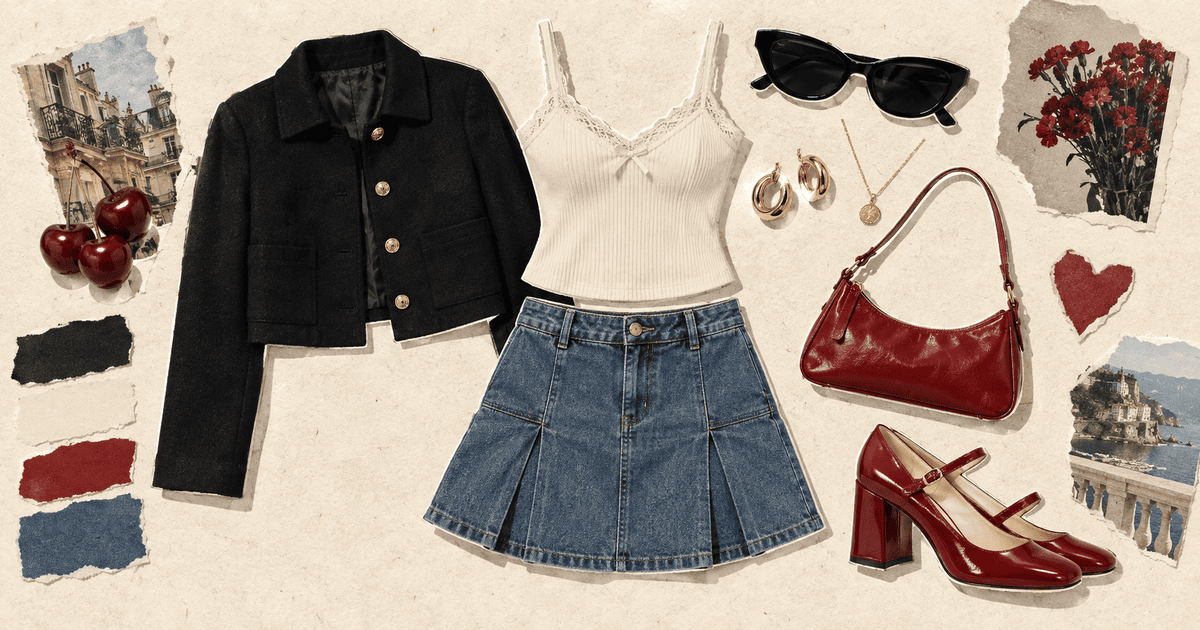
TL;DR: Save clean photos of the clothing you want, add them to Jodu, use Remove BG on each piece, arrange the outfit on a portrait canvas, then add a restrained background and export. For items saved on Pinterest, import the pins directly instead of screenshotting them.
What makes an outfit collage feel like Polyvore
A useful outfit board is more than clothes placed in a row. The original Polyvore sets worked because they did three things well:
- Every item was isolated. A shoe floated cleanly instead of sitting inside a product-photo rectangle.
- The outfit had hierarchy. The main garment was largest; accessories filled the smaller gaps.
- The page told a story. Color, texture and one or two lifestyle details made the clothes feel like a complete look.
That is the recipe we will use.
What you need
- An iPhone running iOS 17 or later.
- Jodu, which is free to download and starts with a seven-day full-feature trial.
- Three to seven clothing or accessory images from your camera roll or Pinterest boards.
- Product photos with a clear outline whenever possible.
You do not need perfect white-background catalog shots. Automatic subject isolation can usually find the garment or accessory, and it happens on-device.
How to make the outfit collage
1. Choose one anchor piece
Start with the item the outfit is built around: a dress, coat, statement top or pair of trousers. This becomes the largest object on the page. Choosing it first stops the board from turning into a random shopping pile.
2. Gather supporting pieces
Add shoes, one bag, and two or three smaller accessories. If you saved them on Pinterest, use Jodu's Pinterest import to select several pins from one board. Otherwise, add images from Photos.
Keep the edit tight. Five good pieces usually read more clearly than fifteen equally important ones.
3. Remove each background
Tap an image and choose Remove BG. Jodu isolates the subject using Apple's on-device vision models, so the photo does not leave your phone. Repeat for every product image that still has a rectangular background.
If a cutout struggles, use an image with stronger contrast between the garment and its backdrop. Lace, loose fringe and transparent fabric are naturally harder than a solid jacket or shoe.
4. Build the outfit from the center out
Place the anchor garment slightly off-center. Add shoes underneath, a bag to one side, then let sunglasses, jewelry or beauty products occupy the smaller spaces.
Do not make every object the same size. A useful starting scale is:
- Main garment: about half the visual area.
- Shoes and bag: about one quarter each.
- Accessories: small accents that guide the eye around the page.
Overlap one or two pieces slightly. The tiny collisions make the composition feel designed rather than catalogued.
5. Add a background with restraint
Polyvore-style sets often worked on white, but a warm paper texture gives the same clean separation with more character. Add one torn-paper shape, a color swatch or a small travel image if it supports the outfit's story.
If the outfit is already colorful, keep the background quiet. If the clothes are neutral, one red, blue or green accent can hold the page together.
6. Add a title only if it helps
A season, destination or short idea—“rainy Sunday,” “museum day,” “first warm night”—can sharpen the concept. Avoid a paragraph. The clothes should remain the fastest thing to understand.
Jodu includes more than 40 fonts, including clean editorial faces and handwriting styles. Text stays editable like any other layer.
7. Export and reuse the formula
Save the finished board to Photos. For a wardrobe series, duplicate the project and swap the anchor piece while keeping the background and spacing. That gives several outfits a consistent visual system.
Three reliable outfit-board layouts
The magazine set
Large anchor piece in the middle, shoes below, bag and accessories orbiting it. This is the closest to classic Polyvore.
The flat-lay column
Top, bottom and shoes run vertically as if dressing an invisible person. Put the bag and jewelry to the side. It is simple and easy to read on a phone.
The outfit plus atmosphere
Keep the clothes on one half and add two or three supporting images on the other: a hotel room, a street, a flower or a material sample. This turns a shopping board into a moodboard.
Frequently asked questions
Does Polyvore still have an outfit maker?
No. Polyvore shut down in April 2018 after its assets were acquired by SSENSE. The original website and apps are no longer available. Read what happened to Polyvore for the short history.
Can I make a Polyvore-style collage from my own clothes?
Yes. Photograph each item against a contrasting floor or wall, add the photos to Jodu, remove their backgrounds, and arrange the cutouts into an outfit. A clear, evenly lit photo produces the cleanest result.
Can I use clothes saved on Pinterest?
Yes. Jodu can import pins from your boards directly into the canvas. Make sure you have permission to publish any third-party images in the finished collage.
Is the background remover online?
No. Jodu's subject cutouts run on the iPhone using Apple's vision models, so your photos are not sent to a background-removal server.